
Why manage your Macs?

The arguments for deep management of your Apple device park are the same as for other platforms.

You want to increase business output while protecting intellectual property - with all forms of operational data. And at the most interesting price. The bigger your business, the more obvious the need to put all of that into automated and managed processes.

If you recognise any of the below, you want managed devices.

  • Your team is spending time - away from core tasks - to manage, update, support, recover, reinstall Apple devices.
  • You have no automated way to onboard new user devices.
  • Your increasingly mobile workforce has access to company data from unsecured networks (yes, coffee shops)
  • Your team is not getting the Apple support they require. This is causing downtime and/or frustration.
  • You have no certain way of knowing which employee has what device, nor what apps they are running.
  • Your team is clicking on phishing mails, and/or you've already had to remedy a breach.
  • You have no way of remotely locking, wiping or off-boarding your company Apple devices.
  • One or more of your devices can't be recovered because they are locked by an ex-employee's personal Apple ID.
  • You are scaling up and feel you are not future-proofing your IT-environment.
  • You are getting reporting demands from C-suite, legal or HR that can't be delivered.

Ringing a bell? Pushing a button? Shaking a tree? Yanking a chain? Get in touch or schedule a chat to discuss your pains.

Schedule your IT-chat

Why manage your Macs?

The arguments for deep management of your Apple device park are the same as for other platforms.

You want to increase business output while protecting intellectual property - with all forms of operational data. And at the most interesting price. The bigger your business, the more obvious the need to put all of that into automated and managed processes.

If you recognise any of the below, you want managed devices:

  • Your team is spending time - away from core tasks - to manage, update, support, recover, reinstall Apple devices.
  • You have no automated way to onboard new user devices.
  • Your increasingly mobile workforce has access to company data from unsecured networks (yes, coffee shops)
  • Your team is not getting the Apple support they require. This is causing downtime and/or frustration.
  • You have no certain way of knowing which employee has what device, nor what apps they are running.
  • Your team is clicking on phishing mails, and/or you've already had to remedy a breach.
  • You have no way of remotely locking, wiping or off-boarding your company Apple devices.
  • One or more of your devices can't be recovered because they are locked by an ex-employee's personal Apple ID.
  • You are scaling up and feel you are not future-proofing your IT-environment.
  • You are getting reporting demands from C-suite, legal or HR that can't be delivered.

Ringing a bell? Pushing a button? Shaking a tree? Yanking a chain? Get in touch or schedule a chat to discuss your pains.

Schedule your IT-chat
Image

What Mobile Device Management (MDM) can do for you

1. Increase workforce mobility

Your team of employees is the production force of your business. Their degree of freedom of movement, enhances the output. You oversee an ever-changing (hopefully growing) number of users, who are increasingly nomadic in how they work.

Controlling all conditional identity and access rights, with all exceptions, requires central management. That way, you know at all times who can see or do what, and in what environment or circumstances.

2. Optimise your Apple ecosystem

Apple devices can do a lot, straight out of the box. But with the right management settings, paired with clever best practices, you supercharge your team's capabilities.

Boost creativity, productivity, collaboration and 'employee happiness'.

3. Fulfil legislation and reporting

It is all still early days, but the increasing amount of directives - e.g. GDPR, ISO 27001, CSRD, NIS2 - demand for tight reporting around security and privacy in business. Without a powerful management platform, you are always behind the times here. And that will cost money in the long run.

4. Use your budget more efficiently

A managed environment prevents many unnecessary costs. By correctly automating installations, onboarding with deployment of devices, applications and user rights, you quickly save a lot of man hours. Further reducing security breaches and support queries is a nice bonus of centrally organised processes.

5. Move from mere control to prevention

A Mobile Device Management (MDM) platform does more than manage a bunch of settings. It provides the foundations for both endpoint protection and user-error prevention; as well as offering a technical framework for Bring-Your-Own-Device agreements with freelancers. Process and performance monitoring provides new insights that help improve workflow and security.


What Mobile Device Management (MDM) can do for you

1. Increase workforce mobility

Your team of employees is the production force of your business. Their degree of freedom of movement, enhances the output. You oversee an ever-changing (hopefully growing) number of users, who are increasingly nomadic in how they work.

Controlling all conditional identity and access rights, with all exceptions, requires central management. That way, you know at all times who can see or do what, and in what environment or circumstances.

2. Optimise your Apple ecosystem

Apple devices can do a lot, straight out of the box. But with the right management settings, paired with clever best practices, you supercharge your team's capabilities.

Boost creativity, productivity, collaboration and 'employee happiness'.

3. Fulfil legislation and reporting

It is all still early days, but the increasing amount of directives - e.g. GDPR, ISO 27001, CSRD, NIS2 - demand for tight reporting around security and privacy in business. Without a powerful management platform, you are always behind the times here. And that will cost money in the long run.

4. Use your budget more efficiently

A managed environment prevents many unnecessary costs. By correctly automating installations, onboarding with deployment of devices, applications and user rights, you quickly save a lot of man hours. Further reducing security breaches and support queries is a nice bonus of centrally organised processes.

5. Move from mere control to prevention

A Mobile Device Management (MDM) platform does more than manage a bunch of settings. It provides the foundations for both endpoint protection and user-error prevention; as well as offering a technical framework for Bring-Your-Own-Device agreements with freelancers. Process and performance monitoring provides new insights that help improve workflow and security.


Image

Managing your Macs, where to start?

If you don't want to compromise on end-user comfort, a full Apple environment is more manageable and secure, than a Windows or mixed environment.

But reality tells us that in enterprise, we always operate in a hybrid (Windows + Mac) situation. This has grown historically, and this won't be reversed in an instant either. Apple penetration in Belgian enterprise environments is below 10%, whereas in the Netherlands, for example, it is already at 40%.

In businesses where Apple is already embedded, it is mostly managed on the same platforms as Windows devices (e.g. Intune). If Apple is not yet offered, it is often due to lack of in-house IT knowledge of the possibilities. The tools and platforms are available, to answer all your security and compliance questions. The technical knowledge can be sourced externally.

Managing your Macs, where to start?

If you don't want to compromise on end-user comfort, a full Apple environment is more manageable and secure, than a Windows or mixed environment.

But reality tells us that in enterprise, we always operate in a hybrid (Windows + Mac) situation. This has grown historically, and this won't be reversed in an instant either. Apple penetration in Belgian enterprise environments is below 10%, whereas in the Netherlands, for example, it is already at 40%.

In businesses where Apple is already embedded, it is mostly managed on the same platforms as Windows devices (e.g. Intune). If Apple is not yet offered, it is often due to lack of in-house IT knowledge of the possibilities. The tools and platforms are available, to answer all your security and compliance questions. The technical knowledge can be sourced externally.

Image

Deploy. Manage. Secure. Scale.

As-a-service

Intune

Apple management, starting from your existing Intune foundations.

Image

MadMacX acts as an add-on to your IT department and manages (Co-Managed) the onboarded Apple devices in collaboration and consultation.

With our in-depth Apple expertise, we jointly work towards the right implementation of all customisation questions regarding automation, security and compliance. And we look for solutions where Intune still falls short.

Jamf

Boost your Apple management with Jamf.

Image

If you want uncompromising Apple integration in your business, we implement the market leader's platform in the MDM-game.

With Jamf, you have full control, scaled-up endpoint security and the most comprehensive deployment options. Communication with Intune is possible to maintain a central Asset Review screen.


Co-management

MadMacX works in a Co-Management collab with your existing IT-department.

You source our Apple expertise as-a-service and we grow along with your changing needs.

It is our commitment to act as a specialised Apple Competence Centre for our customers and keep our technical knowledge and network at the highest level. We complement these expertise services with Apple support (end-user and IT support) and Apple procurement optimisation (purchasing and financing).


Device & user life cycle management

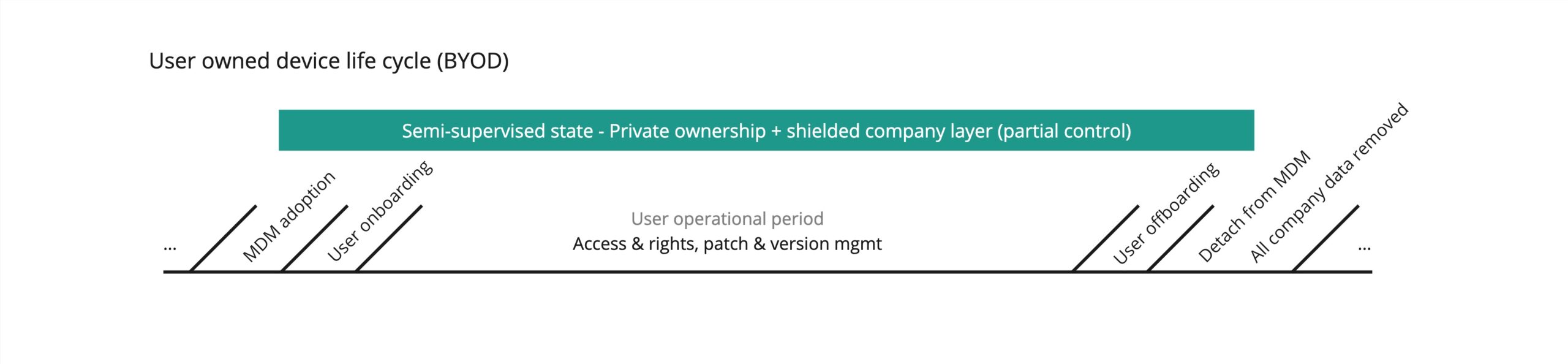
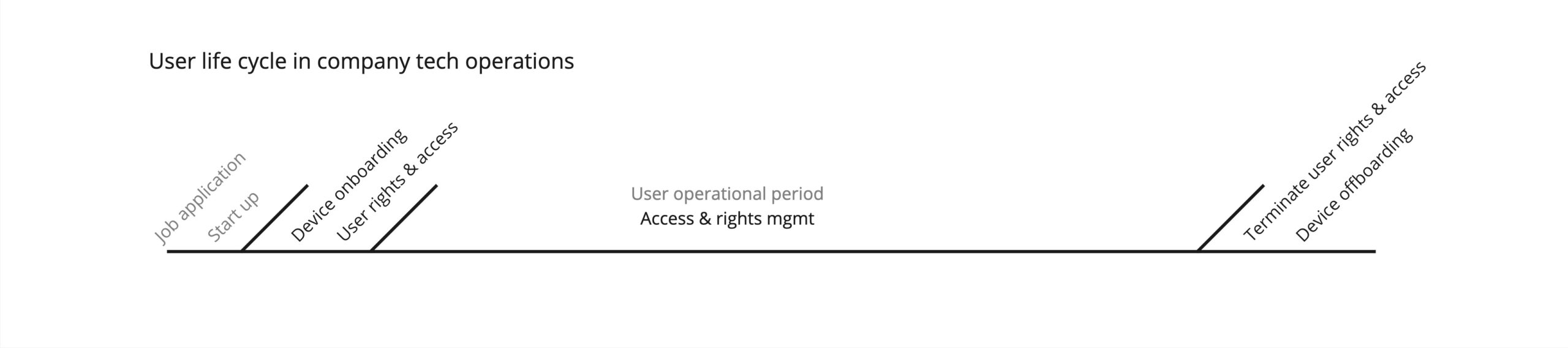
We guide users and devices throughout their entire life cycle with the company.

  • For devices, this ranges from purchasing/renting to recycling the devices.
  • For employees, it starts with onboarding until final off-boarding.

At each stage of these life cycles, device and user rights management play a central role.
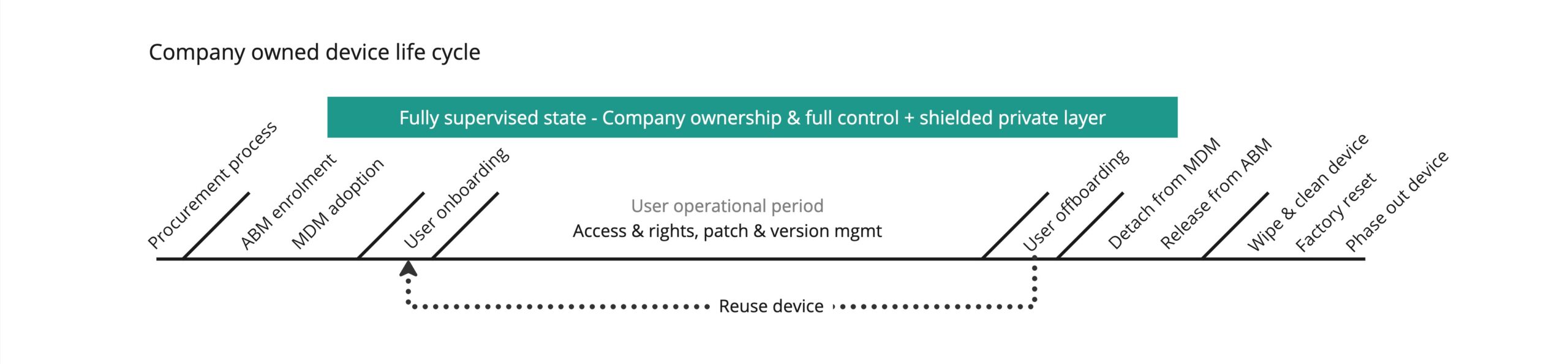


Device life-cycles

Image Image Image
 

Device life cycles

Image Image Image